

Start
Overview
Yalın reads UTF-8 JSON on Android. It does not write JSON and it does not bind to data classes; you map values to your own types by hand. In return it is very fast at the two things apps do most: pulling a few values out of a large response, and building a tree.
- Fast field reads
- Pull a few values out of a large response without building a tree for it. 3.4× faster than fastjson2 at 1 MB.
- Fastest full tree from 16 KB up
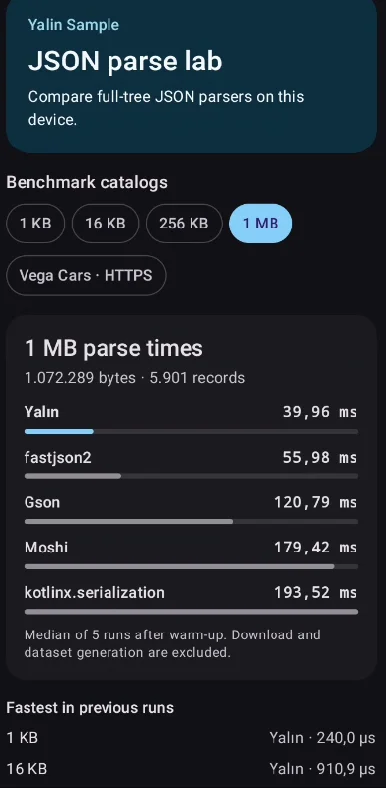
- 1.3× faster than fastjson2 and 2.7× faster than Gson at 1 MB.
- Half the garbage
- A full tree creates about half the objects fastjson2 does and a quarter of what Gson does.
- Strict by default
- Invalid UTF-8, bad escapes, trailing commas and control characters are rejected. Duplicate keys are rejected in trees.
- Honest numbers
- Integers are
LongorBigDecimal; fractions areDoubleonly when finite. - Small surface
- Three entry points. No annotations, no code generation, no reflection, R8 rules included.
Start
Installation
Yalın is on Maven Central.
dependencies {
    implementation("io.github.0xberkay:yalin-android:0.0.2")
}| minSdk | 24 or higher |
|---|---|
| compileSdk | 37 or higher |
| ABIs | arm64-v8a, x86_64 |
| Shrinking | The AAR ships its own R8 rules |
32-bit devices
Native code ships for 64-bit ABIs only. If your app also targets armeabi-v7a or x86, Yalın throws UnsatisfiedLinkError on those devices. Restrict the ABIs, or keep another parser as a fallback.
android {
    defaultConfig {
        ndk { abiFilters += listOf("arm64-v8a", "x86_64") }
    }
}
Start
Pick an entry point
Everything lives on dev.yalin.YalinJson. Prefer a ByteArray input, such as OkHttp's response.body.bytes(): a String has to be encoded to UTF-8 first, which costs 13–21%.
YalinProjection indexed by path order.
YalinJson.parse(bytes)
Many lookups, same input
Parse once, query many times. Returns a YalinDocument that you must close.
YalinJson.parseTree(bytes)
The whole document
Builds an immutable YalinValue tree of Kotlin maps and lists.
Rule of thumb. If the code reads a handful of fields from a big response, use project: it is several times faster than any tree. Use parseTree when the code walks most of the data.
Guide
project — a few fields in one call
The input is parsed, validated and queried in a single JNI call. No document is kept, so there is nothing to close. Results come back as one compact buffer and are decoded lazily: a string is only created when you read it.
import dev.yalin.YalinJson

val input = """{"user":{"name":"Ada"},"items":[{"price":12.5}]}""".encodeToByteArray()

val fields = YalinJson.project(input, "user.name", "items[0].price")
val name = fields.getString(0)    // "Ada"
val price = fields.getDouble(1)   // 12.5
YalinProjection has getString, getLong, getDouble, getBoolean and kind, each taking the index of the path you asked for, plus size.
Guide
parse — a reusable document
When you look up many things in the same input, parse it once. The document lives in native memory until you close it, so always use use {} or try/finally.
YalinJson.parse(bytes).use { doc ->
    val count = doc.getLong("meta.total") ?: 0
    val page = doc.project("items[0].id", "items[1].id")
}
parse also accepts a ByteBuffer. Only the bytes between position and limit are read and the position does not change. A direct buffer is copied natively with no intermediate array; don't modify it during the call.
Guide
parseTree — the whole tree
YalinObject is a Map<String, YalinValue> with keys in document order, and YalinArray is a List<YalinValue>, so the standard collection functions work.
import dev.yalin.*

val root = YalinJson.parseTree(bytes) as YalinObject
val items = root["items"] as YalinArray
val names = items.map { ((it as YalinObject)["name"] as YalinString).value }
parseTree also accepts a String; error offsets are still UTF-8 byte offsets. It is stricter than parse: a repeated object key throws YalinParseException with DUPLICATE_KEY.
Guide
Paths
A path is a list of segments evaluated from the root. Keys are matched after unescaping, so "a" in the document matches the path a.
| Path | Selects |
|---|---|
user.name | Member name of member user |
items[3].price | Zero-based array index, then a member |
[0].id | Index into a top-level array |
matrix[1][2] | Nested arrays |
"" | The root value itself |
- Indices are decimal without leading zeros:
[07]is a malformed path. - A key containing
.,[or], or an empty key, cannot be addressed. UseparseTreefor those. - With a duplicate key, paths return the first occurrence.
parseTreerejects duplicates.
Guide
Path playground
Try paths against your own JSON and see what each getter would do. This runs in your browser with a small JavaScript model of Yalın's path rules, not the native parser.
Guide
Values and types
YalinValue is a sealed interface, so a when over it is exhaustive.
| JSON | Type | Value |
|---|---|---|
null | YalinNull | object |
true / false | YalinBoolean | Boolean |
| string | YalinString | String |
integer that fits a Long | YalinLong | Long |
number with ., e or E that fits a Double | YalinDouble | Double |
larger integer, or a number that overflows Double | YalinBigNumber | BigDecimal |
| array | YalinArray | List<YalinValue> |
| object | YalinObject | Map<String, YalinValue> |
fun describe(v: YalinValue): String = when (v) {
    is YalinString -> "string ${v.value}"
    is YalinLong -> "integer ${v.value}"
    is YalinDouble -> "double ${v.value}"
    is YalinBigNumber -> "big ${v.value}"
    is YalinBoolean -> "bool ${v.value}"
    is YalinArray -> "array of ${v.size}"
    is YalinObject -> "object with ${v.size} keys"
    YalinNull -> "null"
}
Guide
Missing, null and wrong types
Typed getters return null both for a path that selects nothing and for a JSON null. When the difference matters, ask for the kind.
when (fields.kind(0)) {
    YalinKind.MISSING -> { /* no such key or index */ }
    YalinKind.NULL -> { /* present, and null */ }
    else -> use(fields.getString(0))
}| Situation | Result |
|---|---|
Missing path or JSON null | null |
| Value of another type, including indexing an object or reading a member of an array on the way | YalinTypeException(path, expected, found) |
getLong on a fractional or out-of-range number | ArithmeticException |
getDouble on a number that overflows Double (integers are fine) | ArithmeticException |
| Malformed path | YalinPathException(path, position) |
Guide
Errors
Yalın follows RFC 8259 strictly. Invalid input throws YalinParseException with an error and the UTF-8 byte offset where it was found. Nothing is thrown from native code; the error is decoded on the Kotlin side.
try {
    YalinJson.project(bytes, "id")
} catch (e: YalinParseException) {
    log("bad JSON: ${e.error} at byte ${e.offset}")
}
Input that Gson or fastjson2 accepted leniently may fail here. That is expected: fix the producer, or catch the exception.
Rejected
- Trailing commas
- Comments
- Single quotes
- Unquoted keys
NaNand other bare words- Invalid UTF-8
- Control characters in strings
- Bad escapes and lone surrogates
- Leading zeros,
1.,1e - Data after the root value
YalinParseError
- INPUT_TOO_LARGE
- UNEXPECTED_EOF
- UNEXPECTED_CHARACTER
- UNTERMINATED_STRING
- CONTROL_CHARACTER_IN_STRING
- INVALID_ESCAPE
- INVALID_SURROGATE
- INVALID_UTF8
- INVALID_LITERAL
- INVALID_NUMBER
- DEPTH_LIMIT_EXCEEDED
- TRAILING_CHARACTERS
- DUPLICATE_KEY parseTree only
Nesting is limited to 1024 levels and input to 4 GiB. A Rust panic or JNI failure surfaces as a plain RuntimeException.
Guide
From Java
All entry points are @JvmStatic, and YalinDocument is Closeable, so try-with-resources works.
YalinProjection fields = YalinJson.project(bytes, "user.name", "items[0].price");
String name = fields.getString(0);
Double price = fields.getDouble(1);

try (YalinDocument doc = YalinJson.parse(bytes)) {
    Long total = doc.getLong("meta.total");
}
Guide
Memory and threads
- Your bytes are copied. Input is copied into Rust-owned memory during the call, and no pointer into a Java array survives it. You can reuse or change the array as soon as the call returns.
- Documents must be closed. There is no finalizer or
Cleaneryet (it needs API 33), so an unclosedYalinDocumentis never freed by the GC.close()is idempotent. - Queries are thread-safe. Several threads may query one document, and
close()may race them safely: the memory is freed after the last query in flight. A query afterclose()throwsIllegalStateException. - Handles, not pointers. Kotlin holds an opaque generation-tagged
Long. A stale or forged handle resolves to nothing, and reusing a slot never revives an old handle.
Internals
How it works
Each call crosses JNI exactly once, whatever the number of paths.
- 01Your appKotlin or Java hands over a
ByteArray,ByteBufferorString. - 02One JNI call
project,parseorparseTreecopies the input into native memory. - 03UTF-8 checkThe whole input is validated with NEON before anything else.
- 04Structural scanQuotes, braces, colons and commas are found 64 bytes at a time with NEON or SSE2.
- 05TapeThe grammar is validated and the document recorded on a compact tape.
- 06AnswerPath queries read the tape directly. Trees go back in a compact binary form; repeated keys and short strings are reused across trees.
Internals
Benchmarks
AndroidX Microbenchmark, release build, on an Infinix X6833B (Helio G99, Android 13). Gson, Moshi, kotlinx.serialization, Jackson, fastjson2 and org.json were tested. An equivalence test checks that every library returns the same result before anything is timed.
1 MB input · median of a release run · lower is better
Against the fastest other library
fastjson2 was the fastest competitor at every size.
| Input | Read 4 fields | Full tree |
|---|---|---|
| 1 KB | 2.6× faster | 6% slower |
| 16 KB | 4.6× faster | 1.3× faster |
| 256 KB | 4.6× faster | 1.4× faster |
| 1 MB | 3.4× faster | 1.3× faster |
Method and caveats
- The field-read workload is a deterministic product list. Every scenario returns the same four values:
meta.total,items[0].name,items[mid].priceanditems[last].seller.name. - In the full-tree benchmark every library builds and returns its whole tree, and all trees are mapped to the same plain form and compared.
- Gson, fastjson2 and
org.jsonparse leniently by default; Moshi, kotlinx.serialization, Jackson and Yalın are strict. - kotlinx and
org.jsoninclude theByteArray→Stringdecode, which is their usual input. - Clocks were not locked. Library versions: Gson 2.15.0, Moshi 1.15.2, kotlinx.serialization 1.13.0, Jackson 2.23.0, fastjson2 2.0.66.android8.
- Full tables, an Exynos 7904 phone and the parser-only Rust numbers are in the repository's Android benchmarks and Rust benchmarks.
More
Migrating from another parser
- Find where JSON is read and which fields the code actually uses.
- If only some fields are used, replace the model or tree parse with one
projectcall that lists those paths, and build your object from the getters. - If the whole structure is used, call
parseTreeand convertYalinObjectandYalinArrayto your types with small mapping functions. - Keep the old library for writing JSON. Yalın has no serializer.
- Add a test with a real payload that compares the old and new results.
// Gson: builds a full model to read three values
val page = gson.fromJson(body, Page::class.java)

// Yalın: one call, three paths
val f = YalinJson.project(bytes, "meta.total", "items[0].id", "items[0].title")
val page = Page(total = f.getLong(0) ?: 0, firstId = f.getLong(1), firstTitle = f.getString(2))
More
Use with AI agents
Yalın ships an agent skill that teaches coding agents how to add the library, choose between project, parse and parseTree, and handle its errors.
Claude Code
Clone the repository and install the plugin from its local marketplace.
git clone https://github.com/0xberkay/yalin.git
cd yalin
claude plugin marketplace add ./docs
claude plugin install yalin@yalin
Codex and OpenCode
Both read skills from ~/.agents/skills, so one command sets up both.
mkdir -p ~/.agents/skills/yalin && curl -fsSL -o ~/.agents/skills/yalin/SKILL.md \
  https://raw.githubusercontent.com/0xberkay/yalin/main/docs/skills/yalin/SKILL.md
To share it with your team, commit it to .agents/skills/yalin/ in your repository instead. Older Codex versions read only ~/.codex/skills, and OpenCode also reads ~/.config/opencode/skills.
Other agents
Copy SKILL.md into the agent's skills folder as yalin/SKILL.md, or add it to the agent's instructions file.
More
Build from source
You need a Rust toolchain with the Android targets, JDK 21 to run Gradle, JDK 17 as the Kotlin toolchain, Android SDK Platform 37 and NDK 28.2.13676358.
rustup target add aarch64-linux-android x86_64-linux-android
cargo test --workspace --locked
cd android
./gradlew :yalin-android:testDebugUnitTest :yalin-android:assembleRelease
To try an unreleased build in another project, publish it to your local Maven repository with ./gradlew :yalin-android:publishToMavenLocal and add mavenLocal() to the consumer's repositories.